How to start saving money
Lorem ipsum dolor sit amet, consectetur adipiscing elit lobortis arcu enim urna adipiscing praesent velit viverra sit semper lorem eu cursus vel hendrerit elementum morbi curabitur etiam nibh justo, lorem aliquet donec sed sit mi dignissim at ante massa mattis.
- Neque sodales ut etiam sit amet nisl purus non tellus orci ac auctor
- Adipiscing elit ut aliquam purus sit amet viverra suspendisse potent
- Mauris commodo quis imperdiet massa tincidunt nunc pulvinar
- Excepteur sint occaecat cupidatat non proident sunt in culpa qui officia
Why it is important to start saving
Vitae congue eu consequat ac felis placerat vestibulum lectus mauris ultrices cursus sit amet dictum sit amet justo donec enim diam porttitor lacus luctus accumsan tortor posuere praesent tristique magna sit amet purus gravida quis blandit turpis.

How much money should I save?
At risus viverra adipiscing at in tellus integer feugiat nisl pretium fusce id velit ut tortor sagittis orci a scelerisque purus semper eget at lectus urna duis convallis. porta nibh venenatis cras sed felis eget neque laoreet suspendisse interdum consectetur libero id faucibus nisl donec pretium vulputate sapien nec sagittis aliquam nunc lobortis mattis aliquam faucibus purus in.
- Neque sodales ut etiam sit amet nisl purus non tellus orci ac auctor
- Adipiscing elit ut aliquam purus sit amet viverra suspendisse potenti
- Mauris commodo quis imperdiet massa tincidunt nunc pulvinar
- Adipiscing elit ut aliquam purus sit amet viverra suspendisse potenti
What percentege of my income should go to savings?
Nisi quis eleifend quam adipiscing vitae aliquet bibendum enim facilisis gravida neque. Velit euismod in pellentesque massa placerat volutpat lacus laoreet non curabitur gravida odio aenean sed adipiscing diam donec adipiscing tristique risus. amet est placerat in egestas erat imperdiet sed euismod nisi.
“Nisi quis eleifend quam adipiscing vitae aliquet bibendum enim facilisis gravida neque velit euismod in pellentesque”
Do you have any comments? Share them with us on social media
Eget lorem dolor sed viverra ipsum nunc aliquet bibendum felis donec et odio pellentesque diam volutpat commodo sed egestas aliquam sem fringilla ut morbi tincidunt augue interdum velit euismod eu tincidunt tortor aliquam nulla facilisi aenean sed adipiscing diam donec adipiscing ut lectus arcu bibendum at varius vel pharetra nibh venenatis cras sed felis eget.
How to Export Files from FileCabinet CS
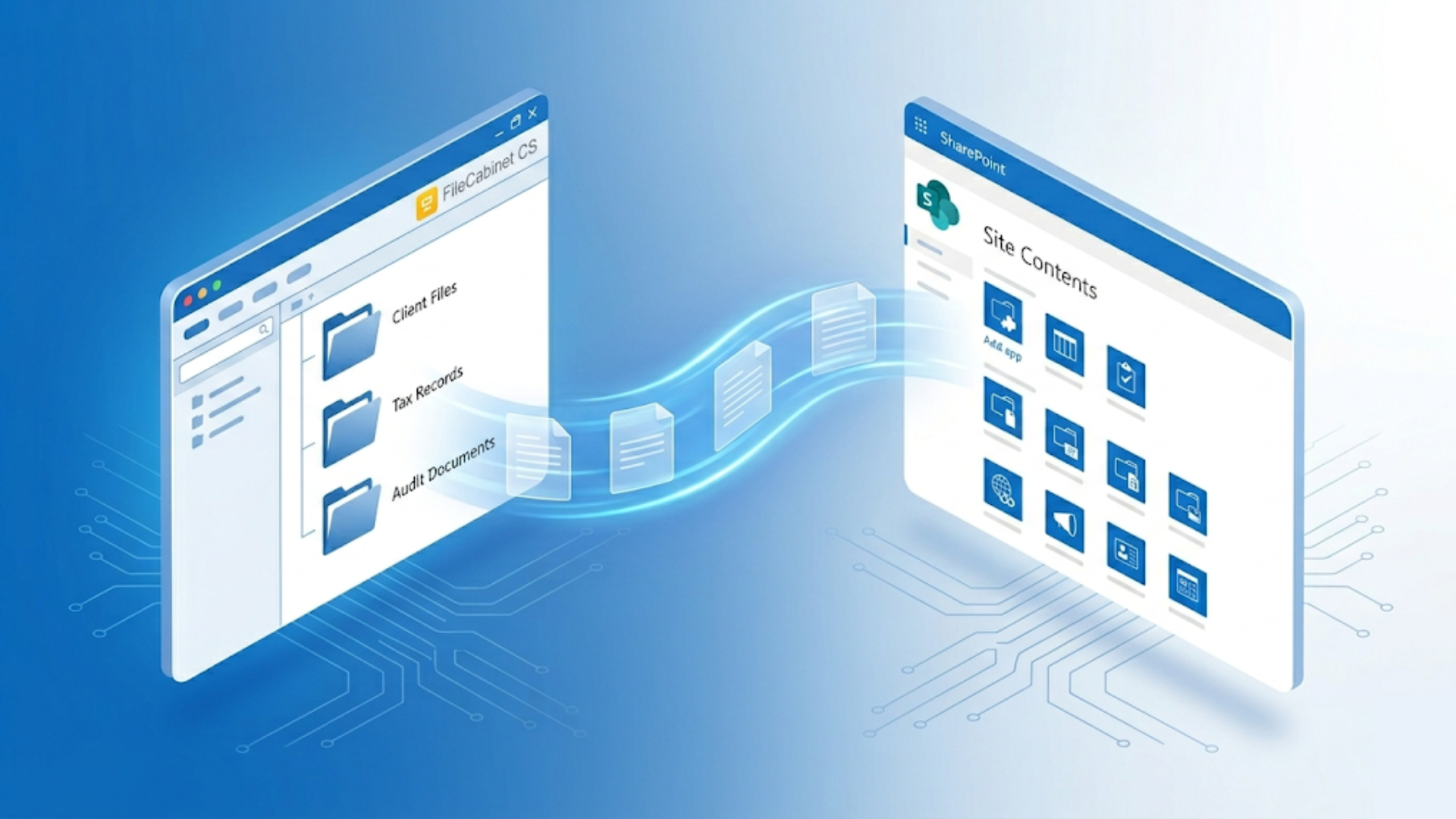
With FileCabinet CS reaching end-of-life, accounting firms need to export their client files before losing access permanently. But unlike most modern software, FileCabinet CS doesn't let you select a folder and click export.
The system stores documents — including tax returns — as individual page objects in a legacy format, which means every document must be reconstituted page by page through the export function. For firms with hundreds of clients and years of history, manual export takes weeks of dedicated staff time. This guide explains exactly how FileCabinet CS export works, what makes it harder than it sounds, and how to decide between doing it yourself and using a professional migration service.
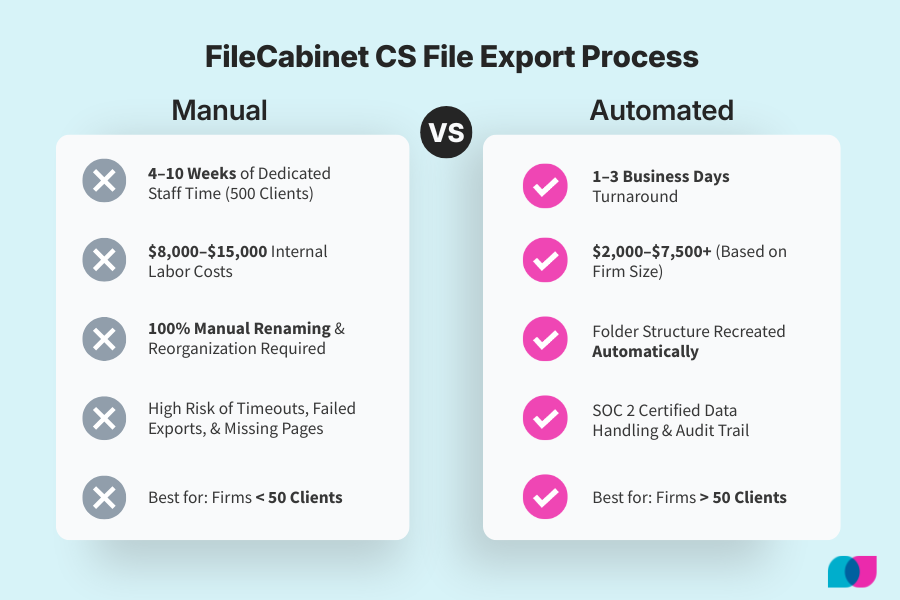
FileCabinet CS export requires manual document-by-document processing due to legacy OLE Structured Storage format. Documents are stored as individual page objects that must be reconstituted through the export function. Manual export takes 2–10 weeks for most firms, while professional migration services complete the process in 1–3 business days. Migration costs range from $2,000–$7,500+ versus $8,000–$15,000 in internal labor costs for manual export at firms with 500+ clients. The export process produces flat file output requiring reorganization, and does not preserve FileCabinet CS folder structure.
Why FileCabinet CS Export Is More Complex Than It Looks
FileCabinet CS does not store documents as standard files on disk. Tax returns, workpapers, and scanned source documents are stored as individual indexed page objects inside a legacy OLE Structured Storage format — a compound document architecture dating to early Windows. A 40-page 1040 is not stored as one PDF. It is stored as 40 separate page objects that must be reassembled.
- Every document requires individual reconstitution. When you export a tax return, FileCabinet CS must gather those page objects sequentially and stitch them into a PDF through its built-in export function — one document at a time. There is no bulk export UI that queues all clients. Export is structured around individual client drawers, and each drawer must be processed separately.
- The folder structure you see inside FileCabinet CS does not survive export. Output lands as a flat collection of files with names like "Document_001.pdf" and "Document_002.pdf." Reorganizing into a usable folder hierarchy — client folders, year folders, document type folders — is a second major effort after the export itself.
- Legacy processing creates unpredictable bottlenecks.The software processes export operations sequentially using architecture that predates modern multi-threading. Large documents take longer. Export jobs on complex returns can time out or produce incomplete PDFs without obvious error messages. A 1040 with multiple K-1s might export as a truncated file with no system warning.
- Professional migration services solve these problems with varying costs and timelines. Third-party services work at the database layer, extracting directly from the underlying data store rather than driving the FileCabinet CS export interface one document at a time. Given the wide range of pricing in this market — from reasonable to predatory — it pays to get multiple quotes before committing to manual export.
For firms with fewer than 50 clients, manual export is manageable. For any practice above that threshold, the internal labor cost and error risk make the decision less obvious than it appears.
Manual FileCabinet CS Export Process Step-by-Step
Here is the actual process for exporting files from FileCabinet CS, with realistic time expectations:
- Open the client drawer. Every client must be handled individually. There is no queue-multiple-clients option. Navigate to the specific client in FileCabinet CS and open their drawer.
- Select the document and initiate Export to PDF. Within the client drawer, select the target document (e.g., 2023 1040). Use File > Send to > File or the Export to PDF option depending on your FileCabinet CS version. This starts the page-assembly process.
- Wait for reconstitution.FileCabinet CS stitches individual page objects into a single PDF. A standard individual return takes 1–5 minutes. Complex returns with attachments, K-1 packages, or amended returns take longer. The process cannot be parallelized or sped up — it runs through the legacy application layer at its own pace.
- Verify output and rename. The system does not apply your preferred naming convention automatically. Each file exports with a generic name and must be manually renamed to match whatever standard your destination system requires (e.g., Smith_John_1040_2023.pdf). Always verify the page count of exported PDFs against what you see in FileCabinet CS— incomplete exports are common and not always obvious.
- Repeat for every document, every client. This sequence applies to every tax return, every workpaper set, every source document folder, every year of history you want to preserve. A firm with 300 clients and 5 years of returns is looking at thousands of individual export operations.
- Reorganize the flat file output. After export, files must be sorted into a client/year folder structure manually. The exported files land as a flat collection with no hierarchy from the original FileCabinet CS organization.
Realistic pace expectations:A staff member working through manual exports can process roughly 10–20 clients per day, depending on document volume and complexity. A firm with 500 active clients should plan for 4–8 weeks of dedicated staff time. This is not background work — it requires active attention for every export operation.
Critical note on timeouts and failed exports: Large multi-part documents and linked drawer exports are known to time out or fail partway through without clear error messages. Thomson Reuters explicitly advises against linking all drawers for a single export run. Always test the export process on a few representative clients before committing to a full migration timeline.
Preparing Your Export Structure
The biggest mistake firms make is starting the export process without a clear plan for where files will land and how they will be organized. FileCabinet CS export produces a flat file dump — preparation prevents weeks of manual reorganization later.
- Decide on your destination folder hierarchy before touching FileCabinet CS. Know exactly how your new system — SharePoint, Liscio, NetDocuments, or another platform — expects files to be named and organized. Build a sample folder structure with one test client before processing hundreds.
- Create a naming convention template and apply it consistently:client ID or name, document type, tax year (e.g., SmithJohn_1040_2023.pdf or 001_Smith_1040_2023.pdf). Write it down and use it from the first export. Renaming thousands of files after the fact is a time-consuming correction that could have been avoided.
- Document your current FileCabinet CS structure before export. Screenshot or list every client's folder hierarchy so you can recreate it in the destination system. This becomes your map when you're organizing the flat file output. Without it, you're guessing at the original structure.
- Create your destination folder structure first, then export into it. Set up the complete client/year/document type hierarchy in your new system before starting export. Export directly into the correct destination folders rather than creating a staging area that requires a second move operation.
- Handle embedded documents separately. Word and Excel files stored natively in FileCabinet CS export in their original format, not as PDF. These need to be accounted for in your file plan and may require a separate conversion step depending on your destination system's requirements.
- Make a backup of the FileCabinet CS database before starting any export process. Once end-of-life arrives, you will not be able to re-run exports if something goes wrong. The backup is your only safety net for missed or corrupted files discovered later.
Common Export Challenges and How to Handle Them
Manual FileCabinet CS export has predictable failure points. Here is what to watch for and how to handle problems when they arise:
- Export jobs timing out on large files: FileCabinet CS can silently fail on large or complex documents, producing a truncated PDF with no error message. Always verify page count on exported returns against what you see in the application. If a 1040 shows 38 pages in FileCabinet CS but exports as 35 pages, the export failed partway through. Export large documents in smaller segments if the full document consistently times out.
- Incomplete PDFs that look complete: This is the most dangerous export problem because it is not immediately obvious. A complete-looking tax return might be missing schedules or attachments. Spot-check critical returns by comparing page counts and visually scanning for expected sections. Do not assume a successful export operation means a complete file.
- Lost folder structure: The flat file output is not a bug — it is how FileCabinet CS export works by design. There is no setting to preserve folder hierarchy. Plan for the reorganization effort upfront as a separate project phase. Do not assume you can fix it quickly at the end of the export process.
- Permission errors on shared or linked drawers: Firms running FileCabinet CS in a multi-user environment or through Virtual Office CS may hit permission errors when exporting certain client folders. These typically occur when documents were created by a different user or when drawers are linked across multiple entities. Resolve permissions before starting the full migration — do not discover access issues halfway through.
- Special characters in file names cause upload failures: FileCabinet CS allows characters in document names that some file systems and destination platforms reject (forward slashes, colons, quotation marks). Audit and clean file names before export to avoid upload failures when transferring to the destination system.
- No built-in audit trail: Manual export produces no system log confirming which documents were exported, when, and to where. Consider maintaining a spreadsheet log as you go — client name, document type, export date, destination path. This becomes important if a completeness question arises later or if you need to re-export specific files.
- Embedded documents not exporting as expected: Word and Excel files embedded natively in FileCabinet CS export in their original editable format, not as PDFs. If your destination system expects PDFs only, these files need a separate conversion step that is not handled by the FileCabinet CS export function.
Automated Migration vs. Manual Export
Manual export is not free labor. It requires active staff attention for every document — select, export, wait, rename, verify — and cannot be delegated to junior staff without close supervision. The real cost comparison includes internal labor, opportunity cost, and error risk.
Internal labor cost is higher than it appears. At a burdened staff rate of $35–$50 per hour and a realistic pace of 10–15 clients per day, a 500-client firm is looking at $8,000–$15,000 in internal labor cost before accounting for errors, re-exports, and reorganization time. This often exceeds the cost of a professional migration service.
Opportunity cost compounds during busy periods. Manual FileCabinet CS export done properly takes weeks of focused attention. Doing it during or near tax season means pulling staff off billable client work. Doing it in the summer means compressing the timeline and increasing the error rate from rushed work.
Error rates compound at scale. Manual processes accumulate errors predictably. Missed pages, incomplete exports, naming inconsistencies, and skipped documents are normal outcomes of high-volume repetitive work. These errors are not caught until someone needs a specific file and discovers it is missing or corrupted.
What automated migration does differently: Professional migration services work at the database layer, extracting directly from the OLE Structured Storage format rather than driving the FileCabinet CS export interface. Documents are reassembled programmatically, naming conventions are applied consistently across all files, and folder structure is recreated automatically in the destination system. The result is a complete, verified file set delivered in 1–3 business days instead of weeks.
Chain of custody and compliance: Manual export routes confidential client tax documents through individual staff workstations and local drives with no documented chain of custody. A SOC 2 certified migration service maintains encrypted transfer protocols, access controls, and audit logs — relevant for firms subject to security reviews or if a client ever questions data handling practices.
The decision framework: Manual export is economically viable for firms with fewer than 50 clients and shallow document history (2–3 years). For any firm above that threshold, the internal labor cost, error risk, and staff disruption make professional migration the rational choice when total cost of ownership is honestly calculated.
Professional Migration Service Options
Migration services that work at the FileCabinet CS database level are destination-agnostic. Whether your firm is moving to SharePoint, Liscio, NetDocuments, Dropbox Business, or another platform, the output is a clean, organized file set ready to upload to any destination system.
Liscio's migration service handles the complete process: database extraction, document reconstitution, folder structure recreation, and delivery in your preferred organization scheme. Pricing reflects document volume and complexity: $2,000 for small firms, $4,000 for mid-size practices, and $7,500+ for large firms with extensive document history. Typical turnaround is 3 business days — not weeks of internal staff time.
SOC 2 certified data handling throughout the process: encrypted transfer protocols, no client data retained after migration completion, and documented chain of custody for compliance purposes. Once migrated, purpose-built AI handles document classification automatically — no manual sorting required.
What to evaluate with any migration service: What is their specific process for verifying completeness against the source FileCabinet CS database? Do they provide a detailed audit log of what was migrated and what was excluded? Are they SOC 2 certified for data handling? Can they recreate your folder structure automatically, or do you need to reorganize files after delivery?
Firms that have already started manual export and stalled partway through are good candidates for professional migration. The migration service works from the original FileCabinet CS database, so manually exported files do not need to be redone or integrated — the complete migration starts fresh from the source.
Migration services solve the structural problems that make manual export difficult: flat file organization, naming convention consistency, incomplete export detection, and processing bottlenecks. For most firms, professional migration costs less than manual export when internal labor is accounted for honestly.
FileCabinet CS Export FAQs
Q: How long does FileCabinet CS export take manually?
A: A firm with 100–200 clients should plan for 2–3 weeks of focused staff time. A firm with 500+ clients should plan for 6–10 weeks. The pace-limiting factor is that every document must be reconstituted and exported individually through the FileCabinet CS application — there is no bulk export function. Compare to 1–3 business days for a professional migration service that works at the database level.
Q: Can I export FileCabinet CS to any document management system?
A: Yes, with important caveats. The export process produces standard PDF files and native-format embedded documents (Word, Excel) that can be imported into any destination platform accepting standard file types. The challenge is not file format compatibility — it is the flat file output structure. You will need to reorganize the exported files to match your destination system's folder hierarchy, either manually or through a migration service that handles this automatically.
Q: How much does FileCabinet CS migration cost?
A: Manual export has no software licensing cost but carries significant internal labor cost — $8,000–$15,000 for a 500-client firm at standard staff rates, plus 4–8 weeks of staff time pulled from other work. Professional migration services run $2,000–$7,500+ depending on firm size, with 3 business day turnaround. For most firms above 50 clients, professional migration costs less in total when internal labor is honestly accounted for.
Q: Is my client data secure during FileCabinet CS migration?
A:Manual export security depends entirely on your firm's own practices — where files land during processing, how they are transferred to the destination system, and who has access during the transition. A SOC 2 certified migration service provides encrypted transfer protocols, documented chain of custody, and contractual confirmation that client data is not retained after migration completion. If your firm is subject to security reviews or serves enterprise clients with data handling requirements, using a certified migration service is the defensible choice.
Skip the manual export process.
Get your FileCabinet CS files transferred in 1–3 business days — organized, verified, and SOC 2 certified.
Manual FileCabinet CS export is technically possible, but it is not the simple folder-and-export process that most accounting software offers. The legacy architecture, flat file output, and document-by-document processing requirements make it a weeks-long project for any firm with substantial document history.
For firms with fewer than 50 clients, manual export is manageable with proper planning and realistic time expectations. For larger practices, the internal labor cost and error risk typically exceed the cost of professional migration services that complete the process in days rather than weeks.
The key decision factor is honest accounting for internal labor cost and opportunity cost. Staff time spent on manual export cannot be spent on billable client work or practice development. When that trade-off is calculated accurately, professional migration becomes the economically rational choice for most accounting firms facing the FileCabinet CS end-of-life transition.